
A WordPress post can open normally for readers while telling Google to leave it out of search results. If a post you want indexed is missing, check whether the live URL sends a noindex directive before you change the title or submit the URL again.
Start with the URL a reader actually reaches
Open the public permalink in a private browser window. If the article was scheduled, first verify that a scheduled WordPress post went live. A preview link or a page that opens only when you are signed in cannot tell you what a crawler receives. If the permalink redirects, write down the final address and run the next checks on that page.
Choose one other public post that you intend to have indexed. Comparing two posts helps you decide where to look later. A directive on one post suggests a page-level rule, while the same directive across several unrelated posts is a reason to inspect broader settings.
Check both the page source and the response headers
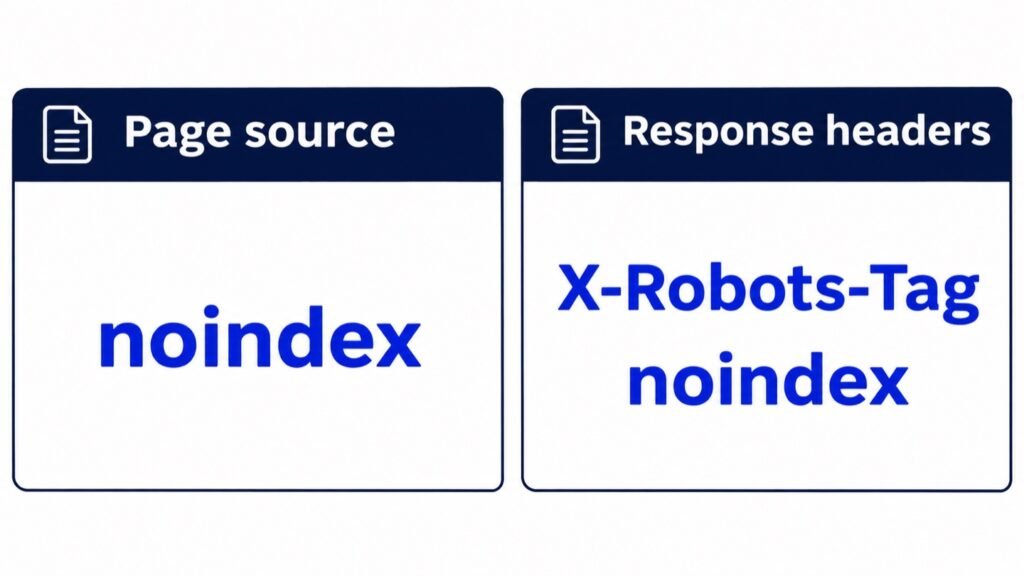
In the browser, open View Page Source and search for noindex. Look for the word in a meta tag in the HTML head whose name is robots or googlebot. A match in a paragraph, a script, or sample code is just text. For example, this guide contains the word many times. Also look for a robots value of none, which Google treats as noindex together with nofollow.
Then open your browser developer tools, select Network, reload the page, and select the final document request for the article. Under Response Headers, look for X-Robots-Tag and check whether its value contains noindex. The header can be present even when the page source has no matching tag.
Google Search Central documents both forms of the directive. Google needs to be able to crawl the URL to read either one. A robots.txt crawl block can prevent that check, so look for crawl errors separately.
Trace the directive to the setting that produced it
If only the target post sends the rule, open that post in WordPress and check its SEO plugin for a post-level robots setting. Review defaults for that post type if several posts share the behavior. Keep intentional exclusions in place and change only the setting responsible for the public pages you want indexed.
If the rule appears across the live site, check Settings → Reading → Search Engine Visibility. WordPress documents that the Discourage search engines from indexing this site setting can output a robots tag on public pages. Confirm you are editing the production site before changing this setting. When the rule appears only as a response header, check the rules in your hosting or CDN configuration as well.
Verify the fix on the live page
After saving, open the public permalink again, repeat both checks, and confirm that the directive is gone from the final response. If you are still seeing the old HTML, clear the affected page from your cache and test again. Recheck your comparison post to catch an unintended broader change.
In Google Search Console, inspect the exact URL and choose Test Live URL. Use the live result to check whether Google can currently fetch the page and whether indexing is allowed. The initial inspection can reflect an earlier crawl. A successful live test removes one obstacle, and Google still decides whether and when to index the URL.
If both public checks are clear but the post moved recently, check the links after a WordPress slug change and verify that the URL you inspected is the one readers and internal links now reach.
Related FAQ
Start with the task, not the tool. AI plagiarism check workflow is useful when it removes a repeated bottleneck from a real publishing workflow instead of adding another app to manage.
It can help organize ideas and surface possible reader questions, but it should not decide the final angle alone. Search intent still needs to be checked against the actual page the reader expects.
It can help organize ideas and surface possible reader questions, but it should not decide the final angle alone. Search intent still needs to be checked against the actual page the reader expects.
It can help organize ideas and surface possible reader questions, but it should not decide the final angle alone. Search intent still needs to be checked against the actual page the reader expects.
It can help organize ideas and surface possible reader questions, but it should not decide the final angle alone. Search intent still needs to be checked against the actual page the reader expects.
Before You Go
Paid links- Advertisement -