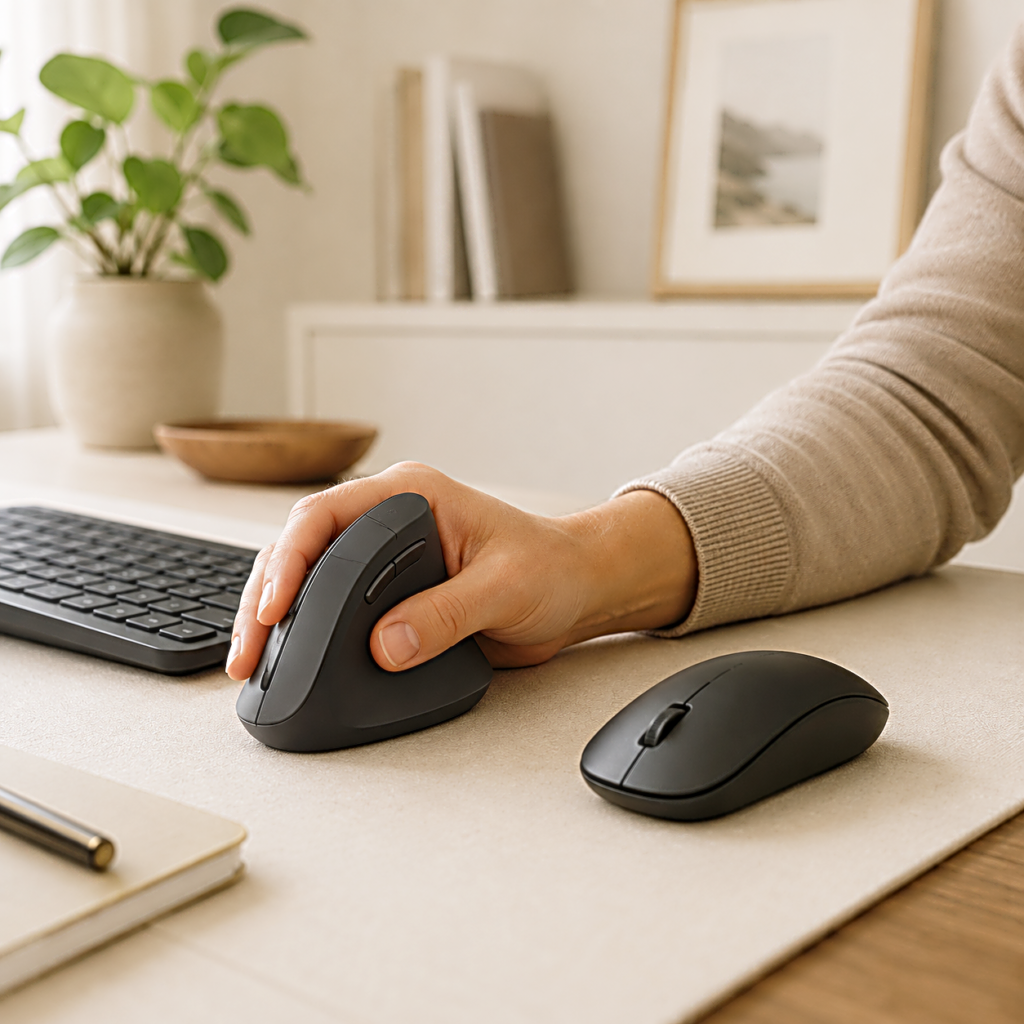
Put your hand on a regular mouse and the palm turns toward the desk. Move it to a vertical mouse and the thumb rises while the palm faces sideways. That rotation is the reason the design attracts attention, but it is not enough to tell you whether the mouse will fit. Hand size decides where the fingers land, the thumb has to steady the taller shell, and the desk still controls how the whole arm reaches it.
The first few minutes can make the change feel larger than it is. The cursor may stop short, a click may shift the mouse, and a side button that looked convenient may sit just beyond the thumb. Some of that is unfamiliar movement. The rest is fit, and the difference appears only when the hand begins repeating the same small motions across a real workday.
The angle changes first, but the rest of the hand has to follow
A conventional mouse keeps the forearm closer to a palm-down position. A vertical shape rotates the hand toward a handshake-like grip, reducing how far the forearm turns inward. In a laboratory comparison of flat, angled, and vertical mice, the alternative shapes reduced forearm pronation, but the fully vertical model also produced the weakest pointing performance in the test. The visible angle changed posture; it did not automatically improve every part of control.
That distinction keeps the word ergonomic in proportion. An ergonomic mouse is not one fixed shape, and a steeper angle is not automatically a better one. A gently sloped body may preserve more of the familiar clicking motion, while a nearly upright shell asks the hand and forearm to move in a different way.
Once the mouse stands taller, the palm can no longer slide forward and backward as easily to hide a poor fit. The fingers need to reach the main buttons without crawling toward them, and the side of the hand needs enough support to stay in place. If either one misses, the hand begins compensating before the new angle has a chance to matter.
A size mismatch shows up where the fingers and thumb meet
On a mouse that is too large, the fingertips may stop short of the click area while the thumb stretches toward the side buttons. A shell that is too small creates the opposite problem. The fingers extend past their intended position, the palm loses support, and the hand may squeeze simply to keep the mouse stable. Length matters, but width and height decide how much of the hand must wrap around the body.
The thumb reveals this mismatch quickly because it does more than rest on the side. The fingers press from one direction and the thumb supports the mouse from the other, creating the grip that keeps a tall shell steady. A thumb rest that is too low can let the hand slide, while one that projects too far may hold the thumb away from a relaxed position.
Side buttons belong to the same decision. For someone choosing a mouse for productivity, back and forward controls can help during browsing, document work, or editing. Yet a shortcut stops saving movement if the thumb must leave its support, reach upward, and rebuild the grip after every press.
This is why product dimensions are useful but incomplete. Side-view photos, the shape of the thumb shelf, and the position of the main buttons show how those measurements meet a hand. OSHA’s workstation purchasing guidance makes the broader point directly: an input device should match the user’s hand size and contour, task requirements, and preference. A vertical mouse is not fitted by angle alone.

When the shell fits, the cursor still needs time to feel familiar
The first slow or uneven cursor movement does not always mean the mouse is wrong. A taller grip changes the contact points that once guided the hand without conscious effort. The thumb now helps stabilize the shell, the side of the palm touches a different surface, and clicking sends force across the mouse from another direction.
Turning the pointer speed up immediately can make those changes harder to read. Leave the setting close to normal at first and use the mouse for ordinary browsing, text selection, and window movement. When the basic motion settles, adjust the speed in small steps until the cursor can cross the screen without a wide arm movement or a tight grip.
Precision tasks expose the remaining fit problems. Selecting a narrow spreadsheet cell or moving a small editing handle should not make the mouse rock during a click. If it does, notice what moved. The shell may be too narrow to support the palm, too light for the click, or held too tightly because the grip is still unfamiliar.
The desk enters the test at this point. A vertical mouse may place the hand differently, but it cannot correct a work surface that forces the shoulder upward or the arm to reach forward. Keep the mouse close to the keyboard, with the elbow near the body. The wrist should remain in line with the forearm rather than bend to meet the shell.
A thick wrist rest can change that relationship again. If it raises the wrist while the mouse remains on the desk, the hand may approach the tall body from below rather than settle into it. Before blaming the mouse, move the rest aside, bring the mouse closer, and see whether the shoulder can relax without the wrist bending up or sideways.

A short trial separates unfamiliar movement from the wrong shape
Replacing the old mouse on day one turns every awkward click into a verdict. Keeping both mice nearby for several days gives the change somewhere to settle. Use the vertical one for browsing, writing, and routine documents, then return to the conventional mouse for a short precision task if necessary. The comparison shows which movements are becoming easier and which still require correction.
Improvement should appear as less attention, not a growing list of adjustments. The hand begins landing in the same place. The thumb reaches useful buttons without leaving its support, and the cursor arrives at small targets without the fingers tightening around the shell. If those changes appear, the early slowness was probably part of learning the new grip.
A persistent stretch or squeeze tells a different story. Fingers should not keep reaching for the buttons, nor should the thumb have to search for support. A shoulder that rises whenever the mouse moves is another fit problem, not a price of adaptation. A less upright model, another size, or a different ergonomic shape may suit the desk and the task better.
That leaves a simpler buying decision than the product pages suggest. Choose the size that lets the palm settle without forcing the fingers forward. Judge the thumb rest before counting side buttons, and make sure the mouse can sit beside the keyboard at a height that keeps the arm relaxed. Then allow enough time for unfamiliar movement to fade without using that adjustment period to excuse a shape that continues to fight the hand.
A vertical mouse changes the angle you can see first. The useful one also fits the quieter details that follow. The thumb has somewhere to rest, the click lands without shifting the shell, and the desk lets the arm stay close. When those details agree, the mouse stops feeling like an ergonomic experiment and becomes part of the work again.
Related FAQ
Test it in the actual routine it was bought for. A useful product should make work, focus, recording, or rest easier without needing constant adjustment.
Test it in the actual routine it was bought for. A useful product should make work, focus, recording, or rest easier without needing constant adjustment.
Test it in the actual routine it was bought for. A useful product should make work, focus, recording, or rest easier without needing constant adjustment.
It belongs in a buying guide only when the article explains the decision before the product. Readers should understand why the category matters before seeing recommendations.
It is worth considering when the current setup creates friction often enough to affect work quality, comfort, or consistency. A new product should remove a real problem, not just add features.
Before You Go
Paid links- Advertisement -